AI Menu & Social Post Generator – Android Native (Jetpack Compose) | OpenAI API | MVVM
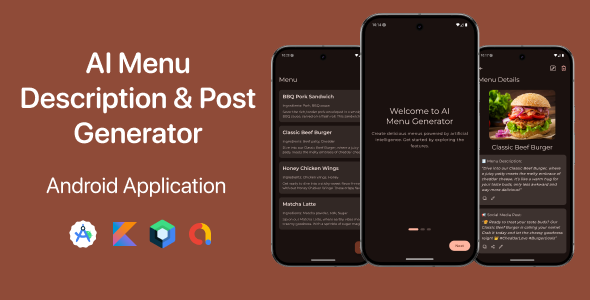
️ AI Menu & Social Post Generator — Android Native (Jetpack Compose)
AI Menu & Social Post Generator is a native Android app built with Kotlin and Jetpack Compose. It uses modern Android architecture (Hilt + MVVM + Clean Architecture), local persistence with Room, and an AI backend via the OpenAI API to instantly generate menu descriptions and social media posts from a single input.
Download Demo APK: Click here to download
Why this app?
This app helps restaurants, cafés, food stalls, and food creators produce high-quality menu descriptions and engaging social posts quickly — perfect for daily content creation, promotions, or white-labeling for clients.
- ✔ Generate polished menu descriptions from a dish name, ingredients and an optional photo
- ✔ Generate social media captions and hashtag suggestions tailored to a selected platform
- ✔ One-tap combined flow: menu description + social post in one go
- ✔ Preview, edit, regenerate, and save results locally
- ✔ Monetization-ready (banner & interstitial ads) via AdMob
✨ Features overview
1. AI Menu Description Generator
Auto-generate appetizing, on-brand menu descriptions using:
- • Dish name
- • Ingredients list
- • Optional uploaded photo (image picker + caching)
Generate text in different tones (examples: Premium, Casual, Fun, Minimal, Luxury — configurable in app).
2. AI Social Media Post Generator
Create ready-to-post captions and assets tailored for specific platforms:
- • TikTok
The generator can suggest hashtags, emojis, and promo-style messaging suitable for seasonal or limited-time posts.
3. Combined Generate Flow (Menu + Post)
Simplified single flow:
- 1. Enter menu details
- 2. Pick or change an image (optional)
- 3. One tap → generates menu description + social post simultaneously
4. Preview, Edit, Regenerate & Save
- • Full-screen preview of generated result
- • Inline edit of description and social post text
- • Regenerate if you’d like alternate suggestions
- • Save or update items to local database
5. Clean, Modern Jetpack Compose UI
- • Material 3 design system
- • Smooth transitions and animated loading states
- • Dark & Light themes supported
- • Compact, readable layouts optimized for mobile
6. Offline Storage with Room
The app stores generated menus and social posts locally using Room (DAO + Repository pattern). It also retains media references managed by the app.
7. Ads & Monetization
AdMob-ready with a simple integration layer. The project includes:
- • Banner ads
- • Interstitial ads (shown via the app’s
AdManager) - • All ad configuration placed inside
AdmobConfiguration
8. Rebrandable & Production-Ready
- • Replace colors, icons & logos
- • Change app name & package
- • Edit AI prompts in the service layer
Technology stack
- Kotlin
- Jetpack Compose
- Hilt (DI)
- MVVM + Clean Architecture
- Room (local persistence)
- OpenAI API integration
- Coroutines & Flow
- Coil for image loading
What’s included
- ✔ Complete Android Studio project (Compose-first)
- ✔ Full UI for generating, previewing, editing, regenerating and saving content
- ✔ Room database schema + repository
- ✔ OpenAI integration in network/service layer
- ✔ AdMob integration +
AdManager - ✔ Image picker & caching utilities
- ✔ Loading & error handling states
- ✔ Dark & Light theme support
- ✔ Developer-friendly architecture
Documentation included
- ✔ Quick start guide (HTML)
- ✔ Full documentation (HTML)
- ✔ How to configure OpenAI API key
- ✔ How to configure AdMob
- ✔ How to change branding
- ✔ How to export APK / AAB
️ How to set up
- Open the project in Android Studio
- Insert your OpenAI API key in
OpenAiService.kt - Insert your AdMob IDs in
AdmobConfiguration - Run the app
Ideal for
- • Developers creating AI apps
- • Agencies building white-label restaurant apps
- • Freelancers serving F&B clients
- • Cafe owners generating daily posts
- • Content creators
Monetization options
- • AdMob ads
- • Subscription unlock
- • Credits for AI usage
- • White-label projects
Support
For support, installation help, or small customization requests:
- Email: [email protected]
- WhatsApp: +855 96 741 3911
I usually reply within a few hours.
Version 1.0 — Initial release
- • AI menu generation
- • AI social post generation
- • Combined workflow
- • Room database
- • AdMob support
- • Complete documentation