Alpha | Responsive Premium Theme for Moodle
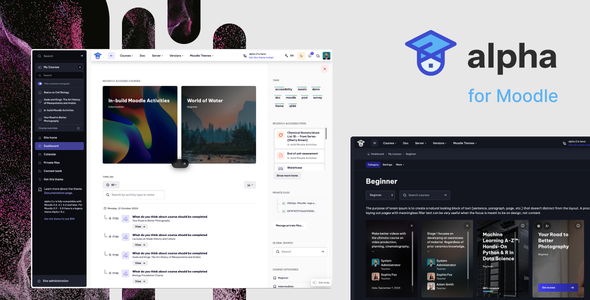
Alpha 2.5.24 [December 13, 2025 ] for Moodle 5.1, 5.0, 4.5 LTS
Alpha 2.5.21 – 4.4, 4.3 – Preview
Alpha 2 – A Cutting-Edge Moodle Theme
Alpha 2 is a powerful, modern Moodle theme to provide a sleek, immersive user experience. Designed with flexibility and performance in mind, it caters to a wide range of educational institutions—whether you’re managing a university, college, school, academy, course hub, training center, or any learning management system (LMS). With robust customization options, broad plugin compatibility, and built-in SEO enhancements, Alpha 2 makes it easier than ever to build a professional, user-friendly online learning environment that stands out.
Supported Moodle Versions and Security Support Timelines
The Alpha 2 Moodle Theme is compatible with the following Moodle versions. Staying informed about each version’s security support timeline ensures your platform remains secure and up-to-date.
- Moodle 5.0
Released: 14 April 2025; Security support ends: 14 April 2026 - Moodle 4.5 (LTS)
Released: 7 October 2024; Security support ends: 6 October 2027 - Moodle 4.4
Released: 22 April 2024; Security support ends: 8 December 2025 - Moodle 4.3
Released: 9 October 2023; Security support ends: 21 April 2025 - Moodle 4.2
Released: 24 April 2023; Security support ended: 7 October 2024 - Moodle 4.1 (LTS)
Released: 28 November 2022; Security support ends: 8 December 2025
For the most current information on Moodle release schedules and support timelines, please refer to the Moodle Developer Resources .
Why Choose Alpha 2 Moodle Theme?
Alpha 2 isn’t just another Moodle theme—it’s a comprehensive design solution that merges sleek dark-mode UI with robust customization and broad plugin support. Crafted for scalability and user-friendliness, it allows you to create a visually cohesive and functionally advanced learning platform with ease.
Wide Plugin Compatibility
- Kickstart Format
- Tiles Format
- Collapsed Topics
- Onetopic Format
- Edwiser Course Format
- Flexible Sections Format
- And many more…
SEO-Optimized Architecture
- Custom Meta Descriptions to boost search engine visibility
- Custom Favicon and Apple Touch Icon for branding
- Theme Color Tag to enhance appearance in mobile browsers
Design & Layout Customization
- Color Customization: Tweak the theme’s palette to match your brand identity
- Top Bar: Customize height, colors, and include an optional “Edit Mode” toggle
- Sidebar & Footer: Complete control over layout, colors, and displayed content
Custom Login Page Layouts
- Choose from 5 professionally designed login layouts
- Enhance the first impression and user experience
Advanced Course Page Configuration
- Hide Course Index Navigation for a cleaner interface
- Simple Course List View for intuitive browsing
- Display Course Progress Bars and Teachers Sections globally
- Use custom course images for visual enhancement
Enhanced Footer Options
- Add social media icons, custom HTML blocks, or quick access buttons
Engagement & Notification Tools
- Custom Alert Bar for urgent announcements or promotions
- Front Page Blocks with 23 predefined layouts for ultimate flexibility
Typography Flexibility
- Supports Google Fonts
- Upload and use self-hosted custom fonts
Right-to-Left (RTL) Layout Support
- Perfect for Arabic, Hebrew, and other RTL languages
Comprehensive Documentation
- Step-by-step guides to make customization simple—even for non-developers
Final Thoughts
With Alpha 2, you’re not just getting a Moodle theme—you’re getting a powerful design toolkit that transforms the way learners and educators interact with your platform. From unmatched customization options and dark mode brilliance to SEO best practices and multilingual readiness, Alpha 2 empowers you to build a learning environment that is both beautiful and functional.
Changelog:
CHANGELOG alpha Moodle Theme - - - [2.5.21] - May 20, 2025 ### Fixed: - Mod Lesson Missing Editor - Popover - Icon Color - Minor Bug Fixes and Improvements ## [2.5.18] - [2.5.20] - May 14, 2025 ### Fixed: - Badges, - Grade Filter Issues, - Minor Bug Fixes ## [2.5.18] - [2.5.20] - April 11, 2025 ### Fixed: - Minor bug fixes related to Moodle 4.5, 5.0 ## [2.5.17] - February 9, 2024 ### Fixed: - Minor bug fixes related to Moodle 4.5 and Tiles Course Format. ## [2.5.16] - January 15, 2024 ### Fixed: - Resolved issues with the missing Course Progress Bar. ## [2.5.15] - December 6, 2024 ### Fixed: - Minor bug fixes for Moodle 4.5 and Tiles Course Format. ## [2.5.15] - October 18, 2024 ### Fixed: - Minor bug fixes for Moodle 4.5. ## [2.5.14] - October 11, 2024 ### Fixed: - Minor bug fixes for Moodle 4.5. ## [2.5.13] - August 16, 2024 ### Fixed: - General minor bug fixes. ## [2.5.12] - July 5, 2024 ### Improvements: - Enhanced WCAG compliance. ### Fixed: - General minor bug fixes. ## [2.5.11] - April 5, 2024 ### Fixed: - General minor bug fixes. ## [2.5.10] - February 21, 2024 ### Added: - Additional SEO Favicon options. ### Improvements: - UI enhancements for Quizzes, Lesson, and Feedback. ### Fixed: - General minor bug fixes. ## [2.5.9] - February 5, 2024 ### Fixed: - Added support for FontAwesome 4. - General minor bug fixes. ## [2.5.8] - February 3, 2024 ### Added: - My Courses Area Position (Alpha - Sidebar - Display My Courses Area before Main Navigation). ### Fixed: - General minor bug fixes. ## [2.5.7] - January 21, 2024 ### Added: - Custom Alert ID (Alpha - Custom Alert - Custom Alert ID) to reset the visibility of the alert. - Realtime Quiz UI Support. ### Improvements: - Enhanced Block Timeline UI. - Improved Feedback Activity UI. - Login Form - "Show/Hide Password" button now works on key press (Space/Enter). - Login Form - Additional icon for "Show/Hide Password". - OneTopic format - Dark mode support. - Improved Messages UI. - Adjusted Top Bar Logo Height (SCSS improvements). - Enhanced Responsive Layout. - Adjusted Secure Layout - Logo Size. ### Fixed: - Badges UI improvements. - Resolved Badges Remote Badge Missing Image Issue. - Fixed Custom Alert - Close Once functionality. - Resolved Remote badge image issue. - Improved Report Grades UI. - Enhanced RWD Improvements. - Fixed 'Skip to' button z-index issue. - General minor bug fixes. ## [2.5.6] - December 14, 2023 ### Improvements: - Advanced checkboxes feature. - Border Radius Generator (Space - Customization - General - Button Border Radius). - Enhanced RWD Improvements. ## [2.5.5] - December 13, 2023 ### Added: - Updated to FontAwesome 6.5.1. - UI Support for QuickMail Plugin. ### Improvements: - Google Analytics Code moved to the head and rendered only for logged-in users. - Enhanced Quiz (Drag-and-drop quiz UI). - Improved Course Activities Moving/Dragging UI/UX. ### Fixed: - Competencies - Relocate Button issue. - General minor bug fixes. ## [2.5.4] - December 1, 2023 ### Fixed: - Course Card - Details Button issue. - Course Index - Indentation issue (Moodle 4.3). ## [2.5.3] - November 28, 2023 ### Fixed: - Several improvements and bug fixes (Moodle 4.3). ## [2.5.2] - September 28, 2023 ### Added: - Child theme support. ### Improvements: - Enhanced Course Competency UI (checkboxes, dark mode). - Improved Glossary UI. - Enhanced Course Index (Moodle 4.3). ### Fixed: - General minor bug fixes. ## [2.5.1] - September 12, 2023 ### Improvements: - Improved Course Index Drawer List Indentation. ## [2.5] - September 7, 2023 ### Added: - Back To Top Button (Space - General - Back to Top Button). - Course Card - Custom Fields (Space - Course Page - Course Card - Show Custom Fields). - New features and better UI/UX for My Courses Box. - Show/Hide Sidebar Button Aria Label (Open/Close). - New Admin Settings Icon. - Sidebar Label on Hover (Space - Sidebar - Sidebar Label Customization). - Tooltips for Messages and Notifications (on the top bar). - Additional Settings for Custom Items (Secondary Navigation - Only on the main course page). - Optional Group menu item (depends on user roles capabilities moodle/course:managegroups). - Mass Actions block UI Support. ### Improvements: - Enhanced Backup UI. - Improved Calendar UI. - Enhanced Course Management UI. - Improved Forms UI. - Enhanced Label Module (RWD). - Improved Lesson Module. - Proctorio Support. - Enhanced Course Format Tiles UI. - Improved Course Image display (on the course page). - Enhanced Grade Report UI. - Improved Login Page (Full-width Select Field). - Enhanced Message UI. - Improved Subcourse Module Dark Mode Support and UI. - Enhanced Quiz Page - UX improvements for quiz navigation. - Fixed missing aria-label for Notification Icon (Top Bar). - Additional WCAG improvements (checkboxes, aria-label, colors). - Enhanced Forum Module UI. - Theme Translations now use parameter {$a} instead of hard-coded site URL. - Enhanced RWD Improvements (Admin layout). ### Fixed: - Resolved duplicate reactions with Point of view - Feedback Plugin. - Fixed several issues with TinyMCE editor. - Fixed first-time drawer block open (forceblockdraweropen) - Mod Book, Quiz, Lesson. - General minor bug fixes. ## [2.4.4] - June 20, 2023 ### Fixed: - General minor bug fixes. ## [2.4.3] - June 6, 2023 ### Fixed: - Resolved missing buttons on Manage course categories and courses. ## [2.4.2] - May 30, 2023 ### Fixed: - Resolved quiz bugs (Moodle 4.2). ## [2.4.1] - May 23, 2023 ### Added: - Default Course Image support. ### Improvements: - Enhanced Course Card (all area is clickable). - Improved Block Navigation UI. - Showing blocks area on hover. - UI for Grid Format. - Enhanced Grader UI for Moodle 4.2. ### Fixed: - Resolved Badges UI elements issues. - Fixed Grading UI issues. - Added support for Point of view - Feedback. - Added support for OpenAI Chat. - General minor bug fixes. ### Removed: - Course Card Get access button (cccfooter). ## [2.4] - April 21, 2023 ### Added: - Course Index Drawer: Custom HTML Area Above and Below the Content Sidebar - Custom Course Index Drawer Area (Top/Bottom). - Additional Body Class depending on user roles. - Additional ID attributes for front page blocks. ### Improvements: - Enhanced Right Sidebar. - General UI Improvements. ### Fixed: - General minor bug fixes. ## [2.3] - March 18, 2023 ### Added: - New block area on the Course page (Right Sidebar). - Front Page Block Area #1 and #2. - New options for course cards including course description and teacher avatars. ### Improvements: - Enhanced Dark Mode support. ## [2.2.6] - March 8, 2023 ### Fixed: - General minor bug fixes (e.g., H5P Custom Styles). ## [2.2.5] - March 6, 2023 ### Added: - Hide Details Link (Space - Sidebar - My Courses). ### Improvements: - Workplace course certificate UI Support. - Database UI for Moodle 4.1. - SCORM UI improvements. - Enhanced RWD Layout. ### Fixed: - General minor bug fixes. ## [2.2.4] - February 27, 2023 ### Fixed: - Resolved Grader Page - Select Field Issue (Moodle 4.1). ## [2.2.3] - February 25, 2023 ### Added: - Optional Admin button on the top bar (Alpha - Top bar - Display "Admin button" on the top bar). ## [2.2.2] - February 23, 2023 ### Added: - Optional Dashboard Link inside the User Menu (Top Bar). ### Improvements: - Enhanced Frontpage Admin menu. - Theme settings: Options that disable features are now highlighted in red. ### Fixed: - Resolved Top Bar Logo Settings issues. - Fixed Sidebar access for Guest users. ## [2.2.1] - February 21, 2023 ### Added: - Settings for Call to action blocks including text size, weight, and color. ### Improvements: - Enhanced Layout Responsiveness. - Improved Dropdown UI. - Enhanced Admin navigation UI on the front page. ### Fixed: - Resolved Dark Mode issues. - Fixed Secure Layout issues. - General minor bug fixes. ## [2.2] - February 18, 2023 ### Added: - Updated to FontAwesome 6.2.1. - Icons for custom modules including: - Card Box - Debate - Learning map - Live poll - Sticky Notes - StudentQuiz - Layout enhancements including: - New UI for the Course Index Sidebar with consistent color schema. - New Dropdown and User Dropdown. - New Debugging UI and Page Navigation. - Additional CSS class (.underline--anim). - Course Index Page enhancements: - New Course Index Icon. - Optional Course Index Sidebar. - Theme Settings improvements: - Block order UX improvements (sorting by position). - Enhanced Blocks settings (#15 - #17). - Dark Mode - translatable title and main theme. - Custom H5P CSS. - Course Index - Sections inside always collapsed (optional). - Main Navigation customization. - Top Bar - Optional Company/Site Name next to the Logo. - Two additional Block Areas on the Front-page (Front Page Blocks Area #1 and #2). ### Improvements: - Layout enhancements including: - Advanced Grading UI. - Atto Editor UI. - Calendar UI improvements. - Categories List - indent for subcategories and number of courses. - Calendar Popover UI (Dark Mode). - Course Index - Icons Alignment. - Block Sidebar UI, RWD improvements. - Grades Report Table enhancements. - Login Page UI improvements. - Quiz UI enhancements. - RTL improvements. - Messages Index improvements. - Sidebar Responsiveness enhancements. - Core improvements: - Course List UI enhancements. - Minor UI improvements for Messages. - Optional Course Progress Bar for Course Card and Course Index Page. - PHP code optimization. - Several RTL improvements. ### Fixed: - Resolved Course progress bar issues. - Fixed Login Page Language Selector (Layout #5). - General minor bug fixes. ## [2.1.4] - September 22, 2022 ### Fixed: - Resolved Sign up layout issues. ## [2.1.3] - September 21, 2022 ### Added: - Block #1 - Slider Interval. - Additional Class for Guest Users (moodle-guest-user). ### Fixed: - Resolved H5P bug fixes. - General minor bug fixes. ## [2.1.2] - September 15, 2022 ### Fixed: - Resolved Course Summary Image issues (added via file manager). - Improved Login page layouts for RWD. - Added BigBlueButton UI Support. ## [2.1.1] - September 12, 2022 ### Fixed: - Resolved Course Card Description issues. - Fixed minor mobile bugs in Login Layout. ## [2.1] - September 12, 2022 ### Added: - Course Card Description - Max Height (Alpha - Course Page). - Course Card Description - on/off toggle. - Course Card Teachers - on/off toggle. - Login page - Optional Forgot Password Link. - Login page - Additional Content under the password field. - Login page - Display a list of identity providers before or after the login form. - Login page - New layout options #4 and #5 (Full height left/right). - Login page - Show/Hide Password feature. - FontAwesome (Theme Setting - General). - Footer Social Icons. - Footer Color Customization. - Front Page - Main Moodle content included in front page content builder. - Front Page Block - customization options (Main Moodle Content Position - Block #0). - Front Page Block - Slider from Alpha 1.5 (Block #20). - Front Page Block - Content with Images 2-column grid (Block #21). - Front Page Block - Categories List (Block #22). - Front Page Block - Categories List - Legacy Block from Alpha 1.5 (Block #23). - Main Menu & Course Navigation Customization (navigation items on/off) (Alpha - Sidebar, Alpha - Course Page). - Optional teacher avatar inside the course card (Alpha - Course Page - Display teachers). - Optional Default Moodle Footer Buttons (Alpha -> Footer). - Top bar - Color Customization - Custom HTML Area -> Link Color, Link Color on Hover. - Theme Setting - Sidebar Icon Color. - Sidebar - Additional field inside the main navigation container with sample code snippet (Sidebar - Custom Navigation Items). ### Improvements: - Enhanced RWD Improvements. - Improved Course Card UI (each card has the same height). - Enhanced Course Index Sidebar on the left. - Improved Hidden Sidebar (up to 1440px sidebar is next to the content). - Adjusted Pagination Hover Color (Blue to Primary 600 - text, Primary 100 - background). - Site home - redirect=0 when the Start page for users is different than "Site home". - Enhanced Theme Settings - description improvements. - General UI Improvements. - Improved Report Builder UI. - Enhanced Progress bar with percentage information (File manager). ### Fixed: - Resolved missing titles on the course index page (Moodle 4.0.2+). - General minor bug fixes. - Fixed Block #0 (Main Moodle Blocks) position issues. - Resolved Block #2 Issue (Video Hero) - Show Colorized Content Wrapper. - Fixed Block #4 (FAQ) translation issue. - Improved Calendar UI. - Ensured My Courses section is fully translatable. - Resolved issues with Plugins table and Settings and Uninstall button (UI). - Enhanced Sidebar Color Customization. - Fixed Theme settings issue - Top bar - Turn on a logo area. - Resolved Quiz edit question issue. - Removed unnecessary background image on the login page (Layout #2, #3). - General minor bug fixes. ## [2.0.0] - June 14, 2022 ### Added: - Initial release of the alpha Moodle Theme. ---- ## [1.0.0] September 17, 2019 + Released