Extrax - Email List Verifier
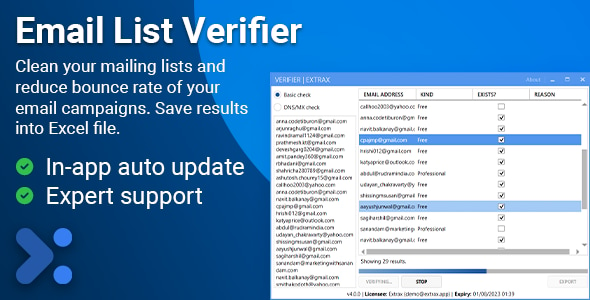
Verify email addresses in bulk to check if they exist and are valid. Supports two verification modes: Basic mode for fast Gmail and Outlook verification, and Advanced DNS/MX mode for comprehensive server-level verification with catch-all detection.
The tool automatically classifies emails as Disposable, Free, or Professional based on domain type, provides real-time verification progress, exports results to Excel with detailed status information, and includes built-in lists of disposable and free email domains for accurate classification.
Features
- Dual verification modes: Basic (Gmail/Outlook) and Advanced (DNS/MX)
- Fast Basic mode verification for Gmail and Outlook accounts
- Comprehensive DNS/MX verification with catch-all detection
- Automatic email classification (Disposable, Free, Professional)
- Built-in database of disposable email domains
- Built-in database of free email provider domains
- Real-time verification progress tracking
- Bulk email verification (paste multiple emails, one per line)
- Excel export with detailed verification results
- Error reason tracking (blocked, disabled, storage full, etc.)
- Parallel processing for faster verification
- Stop control to cancel verification at any time
- Modern Metro UI design with MahApps.Metro
Why Choose Email Lists Verifier?
Email Lists Verifier is the perfect solution for businesses, marketers, and professionals who need to validate email addresses in bulk. Whether you’re cleaning mailing lists, verifying lead databases, reducing bounce rates, or ensuring data quality, this tool provides accurate verification results with detailed classification and status information.
Save Time and Reduce Bounces: Verify thousands of email addresses in minutes instead of manually checking each one. Identify invalid, disposable, or non-existent emails before sending campaigns to improve deliverability and protect your sender reputation.
Accurate Verification: Two verification modes give you flexibility – use Basic mode for quick Gmail/Outlook checks, or Advanced mode for comprehensive server-level verification that detects catch-all domains and provides detailed error information.
Smart Classification: Automatically identifies disposable email addresses, free email providers, and professional domains. This helps you segment your lists and make informed decisions about which emails to include in your campaigns.
Professional Results: Export verification results to Excel with complete status information, error reasons, and classification data. Perfect for data analysis, reporting, and integration with other tools.
System Requirements
- Windows 8 or later (Windows 10/11 recommended)
- .NET Framework 4.7.2 or higher
- Internet connection for email verification
- For Advanced mode: Dedicated public IP and port 25 open (server environment recommended)
Activation
After purchase, you can immediately download and use the software with your Envato purchase code. No additional activation steps required. Simply enter your purchase code when prompted in the application.
Once activated, your purchase will be bound (locked) to your computer. If you ever need to unlock or reset your purchase code for using it on another computer, visit https://envato.one710.dev/ .
Support
For technical support (only after sales), please send an email to [email protected] .
Source Code
Please note carefully, source code is not included with any of the license variants. If you need white-labelled or custom branded versions of our tools with cloud based license management system, please contact us for reseller pricing.
Quality product by One710 .