2FA Authenticator Module for Perfex CRM – Compatible with Google, Microsoft, Authy & More
Note: This is a security module for Perfex CRM . It is not a standalone script and requires Perfex CRM to function.
Overview
2FA Authenticator Module for Perfex CRM enhances your CRM security by enabling two-factor authentication (2FA) using industry-standard TOTP (Time-based One-Time Password) apps such as Google Authenticator, Microsoft Authenticator, Authy, and others.
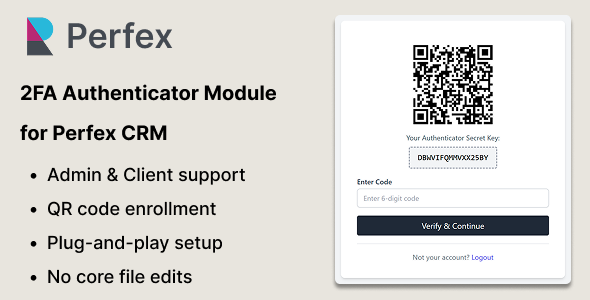
This plug-and-play module adds an additional layer of login security for both customers and admin staff. After login, users will be prompted to scan a QR code and verify using a time-based code from any supported authenticator app.
Designed to integrate seamlessly into your existing Perfex CRM installation, the module requires no core file changes. No code modification is needed — just upload, configure, and boost your CRM’s security in minutes.
Demo
Note: Two-Factor Authentication is disabled for the admin demo to allow direct access to module settings and configuration. To test the full 2FA flow, please use the customer login.
Admin Login: https://perfex.codeonstring.com/admin
Email: [email protected]
Password: 123456789
Customer Login: https://perfex.codeonstring.com/login
Email: [email protected]
Password: 123456789
How to Test
- Log in as a customer or admin using the credentials above
- Scan the displayed QR code using any TOTP-based app (e.g., Google Authenticator, Microsoft Authenticator)
- The app will generate a 6-digit code that refreshes every 30 seconds
- Enter the current code on the 2FA verification screen
- If the code is valid, you will be granted access. Invalid codes will display an error. 2FA cannot be bypassed.
Features
- Seamless integration with Perfex CRM (v3.1.0 and above)
- Clean and minimal UI that matches Perfex CRM’s design
- Enable or disable 2FA independently for customers and admin staff
- Compatible with all major TOTP-based apps – Google Authenticator, Microsoft Authenticator, Authy, and more
- Automatically redirects users to 2FA screen after login if enabled
- Allows users to request 2FA re-enrollment if they lose access to their Authenticator app, with admin-controlled approval workflow
- Session-based verification with no repeated prompts after successful 2FA
- Quick installation and setup – no coding knowledge required
- No core file modifications – fully modular and update-safe
- No external API keys or credentials required
What’s Included
- 2FA Authenticator Module
- Documentation
- Free lifetime updates and 6 months support
Requirements
- Perfex CRM version 3.1.0 or higher
Frequently Asked Questions
What is the Authenticator app and how do I use it?Authenticator apps like Google Authenticator, Microsoft Authenticator, and Authy generate time-based one-time passwords (TOTP). Just scan the QR code shown during login and the app will provide the verification code needed to log in.
Do I need anything else or external credentials to make this module work?No. This module works out of the box and does not require any external API keys or credentials. Users only need any free TOTP-compatible app like Google Authenticator, Authy, or Microsoft Authenticator.
Do I need coding knowledge to use this module?No. This module is fully plug-and-play. You just need to upload, activate, and configure it via the admin panel.
Do I need to modify any core files in Perfex CRM?No. This module is self-contained and does not require any core file modifications.
Is this module compatible with all Perfex CRM versions?Yes. This module works with all Perfex CRM versions starting from 3.1.0 and above.
What happens if a user loses access to their Authenticator app?If a user loses access to their Authenticator app (due to device loss, reset, or uninstallation), they won’t be able to log in using two-factor authentication. In such cases, the user can submit a re-enrollment or reset request directly from the interface. This request will be reviewed and processed by an administrator, who can reset the 2FA status from the admin panel. Once reset, the user will be able to reconfigure their Authenticator app with QR code.
Can I enable 2FA for only customers or only admins?Yes. The module provides individual toggles to enable or disable 2FA separately for customers and admins.
Does this module support multiple languages?The module is translation-ready and comes with an English language file by default. You can easily add other languages by copying and translating the provided language file.
Are updates included?Yes. All future updates are included and will be available via your CodeCanyon account under downloads.
Is there documentation available?Yes, a full installation and configuration guide is included in the download bundle.
Documentation
For detailed instructions on installation and configuration, please refer to the online documentation at: https://perfex.codeonstring.com/2fa-documentation
Support
Comprehensive documentation is included. For further assistance, feel free to reach out to us at [email protected]
Change Log
Version 1.1.0 - Removed QR re-scan options for enhanced security - Added re-scan request flow managed by admin - Admins can now view and reset 2FA authenticator records Version 1.0.0 - Initial Release