MaxReach - SEO & Digital Marketing Agency WordPress Theme
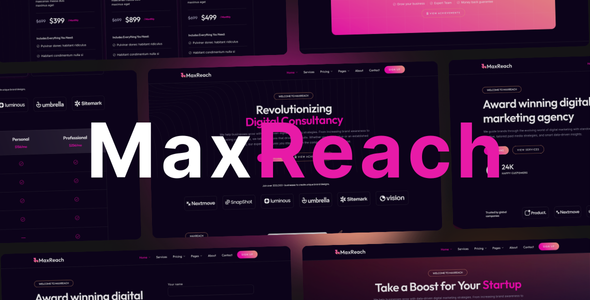
MaxReach: SEO and Digital Marketing WordPress Theme
MaxReach is the WordPress theme for SEO and Digital Marketing. Built for agencies, consultants, and in-house teams who need a site that wins clients. Whether you offer SEO, content marketing, PPC, or full-service digital marketing, this theme gives you a sharp, credible presence without hiring a developer. One license. Your brand. Your pipeline.
The theme runs on Elementor, so you get full control over layout, headers, footers, and inner pages through drag-and-drop. No code. No locked sections. Import the included starter site, swap in your copy and imagery, and go live. That’s the idea behind MaxReach: get your SEO and Digital Marketing site online fast and keep it easy to update.
Why Choose MaxReach for SEO and Digital Marketing
Agencies need sites that load fast, look professional on every device, and make it obvious what you do and who you help. MaxReach is built around that. Clean structure, clear sections for services and case work, and templates that put SEO and Digital Marketing front and center.
- Responsive, pixel-accurate layout. Your site stays consistent on desktop, tablet, and mobile so every visitor gets the same professional experience.
- 100+ Elementor widgets. Contact forms, pricing tables, sliders, testimonials, and more so you can build service pages, comparison tables, and social proof without plugins.
- Starter site included. A full demo with inner pages is ready to import. Customize content and branding instead of building from a blank canvas.
- Live editing with Elementor. Change copy, images, and layout in real time. No switching between preview and edit.
Five Reasons to Use MaxReach for Your Marketing Site
- Built for SEO and Digital Marketing. The structure and demos are tailored to agencies and consultants in this space. You spend time on strategy, not on fighting the theme.
- Flexible. Over 100 widgets and full control over headers, footers, and content. Match your brand and offer set without custom code.
- Responsive by default. Layouts adapt to screen size so your agency looks serious on every device.
- Quick to launch. Starter site and template blocks get you live faster. Less setup, more time for client work.
- Support and updates. Six months of support and lifetime updates so the theme stays compatible with WordPress and Elementor.
Starter Sites: From Import to Live in Minutes
MaxReach ships with a demo you can import in one click. Use it as the base for your SEO and Digital Marketing site. Replace placeholders with your services, team, and case studies. No design skills required.
- Pre-built demo. A full site structure designed for agencies. Home, services, about, contact, and inner pages are already laid out.
- One-click import. No manual setup. Import, then customize.
- Ready-made inner pages. Swap text and images. Structure stays; content becomes yours.
- Fully customizable. Every section is editable in Elementor. Change layout, colors, and typography to match your brand.
Page Building with Elementor
MaxReach is built for Elementor, the drag-and-drop builder for WordPress. You get a live canvas, no coding, and the same flexibility that SEO and Digital Marketing teams expect from their own sites.
- Live drag-and-drop. Build and tweak pages in real time. What you see is what you get.
- Responsive and mobile-friendly. Control how elements look and where they appear on different devices.
- Wide layout options. Full-width sections, custom spacing, and flexible columns so your agency site doesn’t look like a template.
- Animations and effects. Hover states, entrance effects, and scroll behavior to keep the site modern without slowing it down.
- Global styling. Manage fonts, colors, and spacing from one place for a consistent look.
Full Control: Header, Footer, and Content
You can customize the entire front end: header, footer, and every content block. All editing happens in Elementor. No PHP, no child theme required for basic changes.
Header Builder
Edit the header on the front end with Elementor. Build sticky or transparent headers, add logos and menus, and adjust layout and spacing. Pre-made header templates are included so you can start from a design and adapt it.
- Live front-end editing
- Flexible layouts and positioning
- Header templates to import and customize
- Responsive behavior on all devices
Footer Builder
Design the footer in Elementor. Add columns, contact info, links, and CTAs. Use the included footer templates or build from scratch. Changes are visible immediately.
- Drag-and-drop footer editing
- Pre-designed footer templates
- Responsive layout control
Mega Menu Builder
Create mega menus with Elementor. Add columns, images, forms, or maps. Useful for SEO and Digital Marketing teams that want to showcase services or locations directly in the navigation. Menus stay usable on mobile.
- No coding. Build menus in Elementor.
- WooCommerce widgets supported in menus
- Optional forms and Google Maps in dropdowns
- Mobile-optimized display
Popup and Off-Canvas Builder
Use popups and off-canvas panels for lead capture, announcements, or offers. Templates are included. Connect forms, add videos or graphics, and control when and where they appear. Good for growing lists and guiding visitors toward contact or signup.
- Pre-made popup and off-canvas templates
- Form and lead-capture integration
- Support for images, video, and widgets
Content Widgets
Elementor widgets included with MaxReach cover the usual content needs: accordions, tabs, headings, icon boxes, lists, post lists, text rotators, timelines, off-canvas panels, and popup modals. All customizable from the editor.
- Accordion, Advanced Tabs, Blog Posts, Button, FAQ, Heading, Icon Box, List
- Off-Canvas, Popup Modal, Post List, Tabs, Text Rotator, Timeline
Business Widgets
Widgets for agency and business pages: business hours, client logos, Contact Form 7, Google Maps, pricing compare, pricing menu, pricing table, reviews, social icons, team, testimonials, and toggle. Use them on service pages, about pages, and contact pages.
- Business Hours, Clients Logo, Contact Form 7, Google Maps, Pricing Compare, Pricing Menu, Pricing Table
- Reviews, Social Icons, Team, Testimonials, Toggle
Image and Media Widgets
Present work and media clearly: galleries, image boxes, image comparison, hover effects, masks, video players, video gallery, hotspot, image accordion, and audio player. Suited for portfolios and case studies.
- Audio Player, Gallery, Hotspot, Image Accordion, Image Box, Image Comparison, Image Hover Effect, Image Mask, Image Swap, Video, Video Gallery
Infographic Widgets
Countdown, counter, pie chart, and progress bar widgets for stats, offers, and social proof. Handy for SEO and Digital Marketing pages that highlight results or deadlines.
WooCommerce Widgets
If you sell services or products, use the WooCommerce widgets: category list, product carousel, and product list. Style them in Elementor to match the rest of your site.
All widgets work with Elementor’s styling options. You control layout, colors, and typography without touching code.
Updates and Maintenance
MaxReach supports one-click updates from the WordPress admin. You get update alerts and can install the latest version with a single click. Updates keep the theme compatible with WordPress and Elementor.
- One-click updates
- Update notifications
WooCommerce Compatibility
The theme integrates with WooCommerce. Use it to sell retainers, packages, or products. You get control over product layout, sidebar position, and social sharing. Suited for digital marketing firms that monetize through packages or one-off services.
- Multiple product layout options
- Sidebar and product info control
- Social sharing buttons
Blog
Blog layouts are customizable: list, grid, or classic. Control sidebar position and enable social sharing. Use the blog for SEO content, agency news, or thought leadership.
- Classic, horizontal, and grid layouts
- Sidebar position and visibility
- Social sharing buttons
Portfolio
Showcase projects with filterable grids and masonry layouts. Use it for case studies, campaigns, or creative work. Multiple single-portfolio layouts and related items are supported.
- Filterable portfolio grids and masonry
- Related items
- Multiple layout options
Performance and Optimization
MaxReach is built with performance in mind. Optimized asset loading, optional feature toggles, and clean code help keep the site fast. Speed matters for SEO and for keeping visitors on the page.
- Optimized CSS and asset loading
- Option to enable or disable features
- Ongoing performance improvements
Responsive Design
Layouts adapt to screen size. You can control visibility and positioning per device in Elementor so your SEO and Digital Marketing site looks right on phones, tablets, and desktops.
- Device-specific visibility and positioning
- Responsive template blocks
Multilingual Support
The theme is translation-ready and works with WPML. Use it for agencies that serve multiple languages or regions.
- Translation-ready (po and mo files)
- WPML plugin integration
Theme Features Summary
- Elementor Page Builder compatible
- Header and Footer Builder
- Fixed and sticky header, transparent header option
- Mega Menu Builder
- Popup and Off-Canvas Builder
- Unlimited fonts and color schemes
- 800+ Google Fonts, Adobe Fonts
- 1000+ premium icons
- Google Maps integration
- Coming Soon and Maintenance mode
- Social sharing, conditional content
- One-page scroll and one-page layouts
- Lottie, parallax, particles, section dividers
- WooCommerce integration
- Portfolio grid, masonry, filtering, multiple single layouts
- Multiple blog layouts and single post layouts
- Smooth scroll, retina-ready, custom sidebars
- Admin dashboard, 100+ Elementor shortcodes
- Auto-updates, one-click demo import
- SEO optimized, child theme ready
Help and Support
The regular license includes six months of premium support. Our team helps with setup, compatibility, and theme-related questions.
- Support hours: Monday to Friday, 10 AM to 6 PM (IST)
- Response time: Around 24 hours for comments, support tickets, and messages
Useful links:
Documentation
Create Support Ticket
System Requirements
- PHP: 7.4 or greater
- MySQL: 5.7 or greater, or MariaDB: 10.4 or greater
- HTTPS: Required
- upload_max_filesize: 64M
- memory_limit: 256M
- max_input_vars: 3000
- max_execution_time: 120 seconds
- allow_url_fopen: ON
Pre-Purchase FAQs
1. Is MaxReach compatible with the latest WordPress and Elementor?
Yes. MaxReach is tested and updated for current WordPress and Elementor versions so you get stable performance and security.
2. Do I need Elementor Pro?
No. The theme works with the free version of Elementor. Elementor Pro is optional if you want theme builder, dynamic content, or extra widgets.
3. Can I use MaxReach on multiple client sites?
The default license is for one site. For multiple client projects, you need additional licenses or an extended license.
4. Does MaxReach work with WooCommerce?
Yes. You can run an online store for services, digital products, or merchandise. The theme includes WooCommerce-friendly layouts and widgets.
5. What’s included with the purchase?
You get 6 months of support and lifetime updates. Updates keep the theme compatible with new WordPress and Elementor releases.
Changelog
Version 3.1 (1 February 2026)
* Framework update * Faster demo import * Compatible with latest WordPress version * WooCommerce settings in theme panel
Version 2.2 (24 Nov 2025)
* Performance improvements: Added transient caching for remote API calls * Improved admin panel loading speed by 40-50% * Added timeout handling for HTTP requests * Code optimization and cleanup * Keystone Framework Update * Fixed server connection error * Fixed Blog Archive / Blog Post pages * New one click demo importer (Smart One Click Setup Plugin Added)
Version 1.0 (07 Aug 2025)
- ElementsPro Update 4.0.0
Version 1.0 (03 May 2025)
- Initial release