Namaa - Money Management App Dashboard React Template
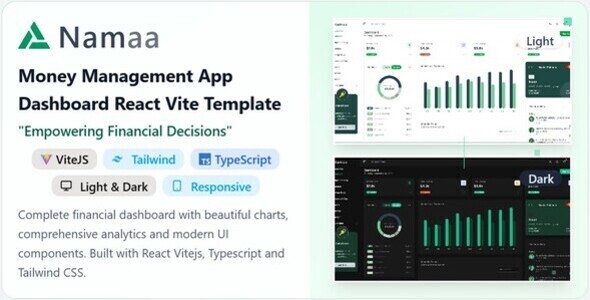
Namaa – Money Management Dashboard (React + Vite + TypeScript)
Welcome to Namaa — a modern, fully typed, and scalable React + Vite + TypeScript dashboard template designed for financial and money management applications.
Key Features
- Light and Dark Mode Support: The template comes with both dark and light mode options, providing flexibility and enhancing user experience based on preference and environmental lighting conditions
- Multiple color themes: Choose from a variety of theme colors like blue, green, red, purple etc. Easily switch between them. And also you can create your own custom theme colors only by changing css color code.
- Multiple layouts: Choose from multiple layouts like sidebar layout, top navigation layout etc.
- LTR and RTL Support: The template supports both Left-to-Right (LTR) and Right-to-Left (RTL) text directions, making it adaptable for a wide range of languages and regions.
- Dynamic Reports: Comprehensive report sections with charts and graphs to visualize financial data effectively.
- Inner Modal Design: All necessary input form in modal view with exclussive design ex. add category, add transaction add new goal , add accounts or cards etc.
- Almost all necessary components for a complete financial dashboard
- Modern Dashboard Design: Professionally designed finance dashboard UI with responsive layouts, clean typography, and scalable components — ready for integration into real-world apps.
- Reusable Components: Built with modular and reusable UI elements like wallet cards, budget summaries, transaction lists, and goal trackers — all styled for consistency and flexibility.
- Developer-Friendly Codebase: Cleanly organized code using modern frontend practices. Easily extendable and customizable for your project needs.
- Wallet & Budget Screens: Pre-built wallet overview pages, budget performance cards, and expense tracking interfaces to give your users a comprehensive finance experience.
- Interactive UI Elements: Engaging visual elements like charts, progress indicators, and tabs to create a dynamic and intuitive user journey.
- Fully Responsive: Optimized for all devices — from desktops to mobile — ensuring your app looks sharp everywhere.
Technical Overview
- Framework: React 19 with Vite (fast build tool and dev server)
- Language: TypeScript for strict type safety and better developer experience
- UI Library: Shadcn/UI (Radix primitives + Tailwind)
- Styling: Tailwind CSS (with CSS variables and theme configuration)
- State Management: Context API (ThemeProvider, SidebarProvider)
- Data Visualization: Recharts for interactive and themed financial charts
- Linting & Formatting: ESLint + Prettier (TypeScript rules enforced)
- Routing: React Router DOM with nested routes & layout grouping
Routing Process
Namaa React uses React Router DOM v7 for client-side routing. Here’s how the routing process works:
- Route Configuration: All routes are defined in
src/App.tsxusing React Router’sRoutesandRoutecomponents. TheBrowserRouterwraps the entire application to enable client-side routing without page reloads. - Layout Wrapping: The
RootLayoutcomponent wraps all routes, providing consistent header, sidebar, and footer across all pages. This ensures a unified user experience without repeating layout code. - Nested Routes: Documentation pages use nested routing. The
/docsroute renders theDocscomponent, which contains anOutletthat displays child routes like/docs/introductionor/docs/installation. - Navigation: Navigation happens via
Linkcomponents or programmatically usinguseNavigate()hook. React Router handles URL changes without full page reloads, providing a smooth Single Page Application (SPA) experience. - Route Matching: When a URL is accessed, React Router matches it against defined routes and renders the corresponding component. The
useLocationhook provides the current route information for active state management in navigation menus.
Example Flow: User clicks a link → React Router matches the URL → Component renders → Layout wraps the content → Page displays with navigation active state.
Modern Design & User Interface
- Responsive Layouts: Adaptive sidebar and header navigation for desktop & mobile.
- Dark Mode: Automatic and toggle-based dark/light theme support.
- Custom Theme Colors: Uses
--primaryand--chart-nCSS variables linked to user-selected themes. - Typography: Configurable via Tailwind config or global CSS variables.
- Type-Safe Components: All components use TypeScript props and interfaces for clarity and IDE autocompletion.
Core Components & Modules
The dashboard ships with modular and reusable TypeScript components, organized by domain:
Dashboard Components
-
BalanceOverview.tsx– Displays total balance and net worth -
BudgetPerformance.tsx– Shows performance of budget allocations with charts -
RecentTransactions.tsx– Displays transaction list with filters and status tags -
QuickLinks.tsx– Configurable buttons for frequent actions -
StatisticsCards.tsx– Typed reusable metric cards with animated values
Financial Modules
- Accounts: Manage and view connected accounts (
AccountSummary,LinkedAccounts,AddAccountDialog) - Budget: Plan and track spending (
BudgetCategories,BudgetAnalysis,AddCategoryDialog) - Expenses: Handle transactions (
AddTransactionDialog,TransactionsList,TransactionFilters) - Savings: Set and monitor savings goals (
SavingsGoalsList,AddSavingsGoalDialog) - Reports: Analyze financial data (
ExpensesByCategory,IncomeVsExpenses,MonthlyTrends)
Customization & Developer Experience
- TypeScript Safety: Strictly typed props, API responses, and utility functions
- Tailwind CSS: Utility-first design with theme color variables (light/dark mode aware)
- Shadcn/UI: Pre-styled and accessible components with easy overrides
- Theme Provider: Controls color scheme, direction, and layout from a single context
- Dynamic Charts: Chart colors auto-adjust based on theme primary color
- Reusable Utilities: Includes
cn()helper for class merging andformatCurrency()for number formatting
Accessibility & Performance
- ARIA-compliant UI: Built with Radix primitives ensuring accessibility by default
- Semantic HTML: Improved SEO and screen-reader support
- Fast Development: Vite’s lightning-fast HMR (Hot Module Replacement) for instant updates
- Optimized Builds: Vite’s optimized production builds with tree-shaking and code splitting
- Client-Side Rendering: Fast initial load with efficient React hydration
- Type-safe Data: Consistent API response types and validation
Dashboard & Overview
Our intuitive dashboard provides a complete overview of your financial health at a glance.
Financial Summary
View your total assets, expenses, income, and savings in one place with visual representations of your financial status.
Quick Actions
Perform common tasks like adding money, sending payments, or paying bills directly from the dashboard.
Recent Transactions
See your latest financial activities with detailed transaction history and filtering options.
Wallet Overview
Monitor all your accounts and wallets with real-time balance updates and quick access to details.
</section> <section class=”feature-section”>Wallet Management
Comprehensive tools to manage multiple financial accounts and wallets in one place.
Multiple Wallet Support
Create and manage different wallets for various purposes (savings, emergency funds, travel, investments).
Money Transfers
Easily transfer funds between your wallets or send money to other users and external accounts.
Transaction History
Detailed logs of all transactions with advanced filtering and search capabilities.
Currency Support
Manage wallets in different currencies with automatic conversion and exchange rate tracking.
</section> <section class=”feature-section”>Budget Management
Powerful budgeting tools to help you plan and track your spending.
Budget Categories
Create custom budget categories and allocate funds to track spending across different areas.
Spending Limits
Set monthly or weekly spending limits with alerts when you approach or exceed your budget.
Budget Calendar
Visualize your spending patterns throughout the month with an interactive calendar view.
Budget Insights
Receive personalized insights and recommendations to improve your budgeting habits.
</section> <section class=”feature-section”>Bill Management
Never miss a payment with our comprehensive bill tracking and payment system.
Bill Tracking
Track upcoming, recurring, and paid bills with due date reminders and payment status.
Recurring Bills
Set up automatic tracking for monthly subscriptions and recurring expenses.
Bill Payment
Pay bills directly through the platform with secure payment processing.
Spending Analysis
Analyze your bill payments by category with detailed charts and breakdowns.
</section> <section class=”feature-section”>Financial Goals
Set, track, and achieve your financial goals with our goal management system.
Goal Creation
Create custom financial goals with target amounts, deadlines, and contribution plans.
Progress Tracking
Monitor your progress toward goals with visual progress bars and percentage tracking.
Goal Categories
Organize goals by category (savings, major purchases, travel, education, etc.).
Goal Insights
Receive recommendations and projections to help you reach your goals faster.
</section> <section class=”feature-section”>Reports & Analytics
Gain valuable insights into your financial behavior with comprehensive reports.
Income & Expense Reports
Detailed breakdowns of your income sources and expense categories over time.
Spending Trends
Visualize your spending patterns with interactive charts and graphs.
Savings Analysis
Track your saving rate and growth over time with projections for future savings.
Export Options
Export reports in various formats for tax purposes or external analysis.
</section> <section class=”feature-section”>Security & Personalization
Keep your financial data secure while customizing the platform to your preferences.
Secure Authentication
Multi-factor authentication and secure login options to protect your financial data.
Theme Customization
Personalize the interface with custom color themes, light/dark mode, and layout options.
Notification Preferences
Configure alerts and notifications based on your preferences and priorities.
Account Settings
Manage your profile, security settings, and connected accounts in one place.
</section> </main> <footer>© 2023 TrendyCoder. All rights reserved.
For more information, contact our dev team. [email protected]
</footer>