Shopapay eCommerce Flutter UI Kit
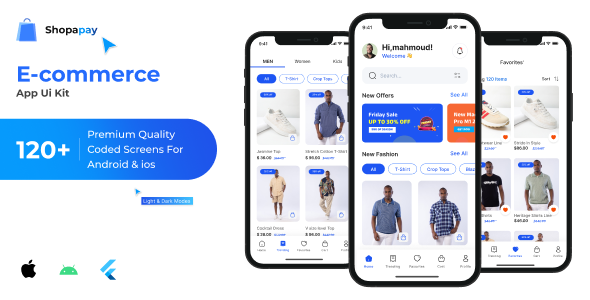
Shopapay – Flutter E-commerce App
Shopapay is a comprehensive e-commerce application built with Flutter. It provides a seamless shopping experience for users, enabling them to browse products, add items to their cart, and make secure purchases. The app also includes features for managing orders, tracking deliveries, and user authentication.
Key Features at a Glance
Product Management:
- Browse extensive product catalogs
- View detailed product information
- Filter and search for specific items
- Track product availability
Shopping Experience:
- User-friendly navigation
- Intuitive product browsing
- Seamless shopping cart management
Payment Processing:
- Multiple payment options
- Secure transaction handling
- Quick checkout process
- Order summary and confirmation
User Account Management:
- Easy registration and login
- Profile management
- Order history tracking
- Delivery status updates
- Address management
- Wishlist functionality
- Notification center
- Settings customization
User Interface Features:
- Clean, modern design
- Responsive layouts
- Intuitive navigation
- Smooth animations
- Optimized for performance
Multilingual Support
- English
- Arabic
- Additional languages can be added
Color Scheme
- Light Primary: #1D55F3
- Dark Primary: #246BFD
- Light Second: #212121
- Dark Second: #F7F7F7
- Light Third: #616161
- Dark Third: #E8E8E8
- Border: #F2F2F2
- Success: #4CAF50
- Warning: #FF6E40
- Error: #FF5252
- Delete: #FF3D00
How to Get and Run the App
Follow these steps to set up and run the e-commerce app on your local machine:
Please make sure you have Flutter installed on your system. Follow the installation guide at Flutter.dev .
Install an editor like VS Code or Android Studio.
Set up an Android emulator or connect a physical device.
Steps to Get and Run the App
Clone the repository
Navigate to the project directory
Fetch the dependencies by running “flutter pub get”
Run the app on your connected device or emulator by running “flutter run”
How to Add a New Language
Add the Language File: Open the lib/l10n/ directory and add a new .arb file for the desired language.
Define Translations: Inside the new .arb file, add translations for all keys.
Example:
{ “hello”: “Hola”, “welcome”: “Bienvenido” }
Generate Localization: Run the “flutter pub run intl_utils:generate” command in your terminal to regenerate the localization files.
Add LanguageModel: Add a new LanguageModel to the supportedLanguages list in language_model.dart.
Test the New Language: You can change the app’s language to the new language and see the translations in the app by changing it from the settings page.
Download the APK file to explore the full functionality of our application and see it in action:
Download Shopapay APK
If you have any questions or need support, feel free to contact us at [ [email protected] ].
© 2025 Shopapay – Flutter E-commerce Application. All rights reserved.