Smart MultiCalculator – All-in-One Android Calculator App (29+ Tools, AdMob + Unity Ads)
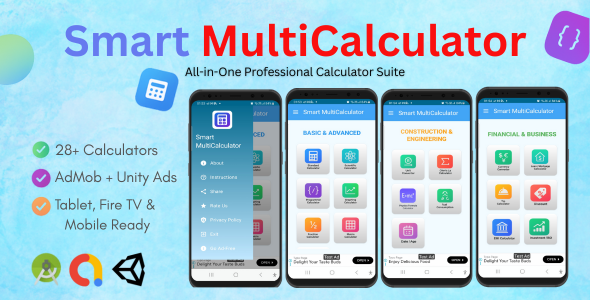
Smart MultiCalculator – All-in-One Android Calculator App
Smart MultiCalculator is a powerful and versatile Android application built with Kotlin & Jetpack Compose. It combines 29+ calculators across multiple categories into one clean, colorful, and professional app. Perfect for students, professionals, engineers, business owners, and everyday users.
✨ Key Features:
- 29+ calculators across categories: Basic, Scientific, Financial, Health, Engineering & Miscellaneous
- Modern & responsive UI with gradient tiles and dynamic dashboard
- Built using Jetpack Compose with clean architecture
- Supports Android tablets, Fire Tablets, and Fire TV
- Integrated AdMob (Banner, Interstitial, Rewarded, App Open Ads)
- Integrated Unity Ads for extra monetization
- “Go Ad Free” unlock option with rewarded ads logic
- Lightweight, optimized performance, easy to customize
Technologies Used:
- Kotlin – Primary language
- Jetpack Compose – Modern UI toolkit
- Navigation Compose – Smooth navigation between screens
- Hilt – Dependency Injection
- AdMob + Unity Ads SDKs
What You Get:
- Full Android Studio project source code
- Clean, modular, and well-documented codebase
- Documentation (PDF) for setup, configuration, and customization
- Ready-to-publish app with AdMob & Unity Ads integration
Categories & Calculators Included:
- Basic & Advanced: Standard, Scientific, Programmer, Graphing, Fraction, Matrix, Equation Solver
- Financial: Currency Converter, Loan/Mortgage, Tip, Discount, EMI, ROI, Tax
- Health & Fitness: BMI, Calorie, Body Fat, BMR
- Engineering & Utilities: Unit Converter, Ohm’s Law, Physics Formulas, Fuel Consumption, Date & Age
- Miscellaneous: Percentage, Statistics, Probability, Time, Zakat/Donation, Cooking Converter
This source code is ready to be published on the Play Store or customized for your projects. It is designed with scalability and monetization in mind.
APK: https://www.mediafire.com/file/pct85s207jk8xyf/SMCDEMO.apk/file
VIDEO: https://youtu.be/QTrOg6KcEUg
Changelog: Google Play Store Families Policy Compliance Fix Version 1.0.1 – Compliance Update
Technical Changes
Ad Implementation Fixes
- Switched Interstitial Ads: Replaced
InterstitialAdwithRewardedInterstitialAdto ensure ads can be closed after 5 seconds, complying with Families Policy requirements. - Disabled App Open Ads: Removed app open ad functionality as they cannot be made closable within the 5-second requirement.
- Updated Ad Loading Logic: Modified
AdManager.ktto use rewarded interstitial format for all navigation-triggered ads.
SDK Updates
- AdMob SDK: Updated from 23.2.0 to 22.6.0 (compatible with minSdk 21).
- Unity Ads SDK: Updated from 4.10.0 to 4.9.2.
- Unity Mediation: Updated from 4.10.0.0 to 4.9.2.0.
Code Changes
-
ads/src/main/java/com/aclabs/ads/AdManager.kt- Changed
InterstitialAdtoRewardedInterstitialAd - Updated loading and display methods
- Maintained ad-free functionality
- Changed
-
ads/src/main/java/com/aclabs/ads/AppOpenManager.kt- Disabled
showAdIfAvailable()method - Added compliance comment explaining the change
- Disabled
-
gradle/libs.versions.toml- Updated AdMob, Unity Ads, and Unity Mediation versions
Compliance Fixes
Issue 1: Unclosable Ads
- Problem: Ads interfered with app use and could not be closed after 5 seconds.
- Solution: All ads now use formats that allow closing after 5 seconds.
- Impact: Users can dismiss ads without being stuck.
Issue 2: Ad Content Rating
- Problem: Ad content was not consistent with the app’s content rating.
- Solution: Ensured proper ad serving through certified SDK versions.
- Impact: Ads are now filtered for family-friendly content.
Issue 3: SDK Certification
- Problem: Required use of Families Self-Certified Ads SDKs.
- Solution: Updated to certified SDK versions compatible with minSdk 21.
- Impact: App now uses officially certified ad SDKs.
User Experience
- Interstitial ads remain functional but are now closable.
- App open ads are disabled to prevent unclosable interruptions.
- Banner ads remain unchanged and compliant.
- Ad-free purchase functionality is fully preserved.
️ Build System
- Resolved DEX compatibility issues with minSdk 21.
- All modules compile successfully.
- Gradle build system updated for compatibility.
✅ Testing Recommendations
- Verify interstitial ads appear and can be closed after 5 seconds.
- Confirm no app open ads appear on app launch.
- Ensure ad-free mode still works correctly.
- Test on Android API 21+ devices.
Next Steps for Play Store
- Build release APK with these changes.
- Update app content rating questionnaire in Play Console.
- Submit the app for review.
- Monitor for additional policy feedback.
Date: January 17, 2026
Status: Ready for Play Store resubmission