SVG Editor
Before asking any question, please read the documentation and Frequently Asked Questions !
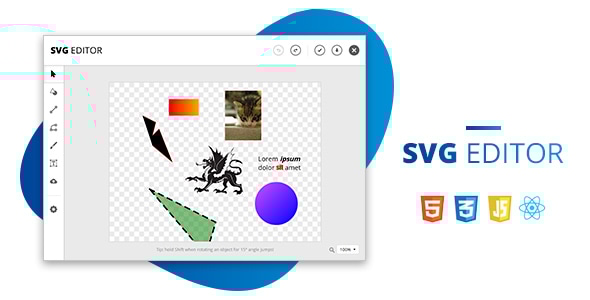
A super simple yet powerful, user-friendly, browser-based SVG vector editor. Built with the latest web development techs: React.js and Fabric.js.
Provide your users an easy-to-use drawing tool. Or alternatively, it’s also a great starting point to build more complex things, like Canva .
Editor Features
The aim was to keep the editing experience easy for the average user. It contains only the minimum, most basic tools that are necessary to draw almost anything.
- Object settings: color & gradient fill, border, alignment, transformations, image effects
- Basic shapes included
- Connectable lines and curves, free draw
- 15° jumps on rotation and line drawing (while holding Shift)
- Textbox with font settings
- File upload via HTML5 File API, so we don’t need a server
- Save image as SVG, JPG or PNG
- Basic shortcuts: arrow key, undo/redo, copy/paste
- You can also paste an image from the clipboard
- Zoom (Ctrl +/-, Ctrl + mouse wheel)
- Cross-browser support, displays a warning for old browsers
- Touch friendly (tested on touchscreen notebook)
Code Features
- Built with the latest React features
- Re-usable JS components
- Easy to translate: all texts are stored in a JSON file
- Clean, commented code
- Works in all modern, major browsers
- Easy to maintain and modify
- Documentation
Changelog
v2.0.0 – January 30, 2026
- now we display the dragon test SVG locally as well - replaced kitten image URL due to CORS issues, which also broke saving the image as SVG - refactored base from Create React App to Vite, all .js files were renamed to .jsx extension - updated Fabric to v5 - Object.setGradient() was removed, now using Object.set('fill', new fabric.Gradient(options))) - Canvas.trigger() was removed, replaced with fire() - forked react-color package to fix warnings - transform events were removed: object:rotated/scaled/moved/skewed, we access them now via object:modified - selection:updated and selection:created events do not have anymore the following properties: updated, target - updated files (all .js files were renamed to .jsx extension) - package.json - src/components/CanvasSettings.js - src/components/DrawSettings.js - src/components/FabricCanvas.js - src/components/InputRange.scss - src/components/SelectionAlignSettings.js - src/components/SelectionBorderSettings.js - src/components/SelectionColorSettings.js - src/components/SelectionEffectSettings.js - src/components/SelectionObjectSettings.js - src/components/SelectionTextSettings.js - src/components/Shapes.js - src/components/UploadSettings.js - src/utils/copyPaste.js - src/utils/demoContent.js - src/utils/lineDrawing.js - src/utils/pathDrawing.js - src/utils/textBoxDrawing.js - vendor/* v1.1.2 – April 12, 2023
- fix: after fitting canvas to content, clicking the download resets canvas to previous size - updated files: - src/components/CanvasSettings.js - src/components/SelectionTextSettings.js
v1.1.1 – March 1, 2023
- fix: textbox issue, after typing we couldn't change font style on other textboxes - fix: textbox overall stylings are displayed properly now on direct textbox switch - fix: now you can copy paste text from/to textbox editing - fix: overflow-y vertical scrollbar - updated files: - package.json - src/App.js, index.scss - src/components/FabricCanvas.js, InputAmout.js, InputAmount.scss, SelectionObjectSettings.js, SelectionSettings.js, SelectionTextSettings.js, ToolPanel.scss - src/utils/copyPaste.js, textBoxDrawing.js, usePrevious.js
v1.1.0 – October 18, 2022
- added a changelog - base app update, package updates, fixed a bunch of deprecated warnings - app now supports latest LTS Node version (v16.17.1) - updated Fabric to latest 3.x.x version (v4 and v5 contains breaking changes, it will be a bigger update later) - updated app render to React 18 - fixed SASS lint issues - fix: when only a part of a text was selected, font size change didn't work - fix: CTRL + scroll zoom issues - fix: alignment tools didn't work well when zoomed in/out - fix: downloaded image size changed when zommed in/out - fix: ungrouping just grouped objects didn't work - fix: selection settings panel disappeared after ungrouping - updated files: - package.json - src/App.js, index.js - src/components/Button.scss, FloatingMenu.js, GradientPicker.scss, InputRange.scss, SelectionAlignSettings.js, SelectionObjectSettings.js, SelectionTextSettings.js - utils/saveInBrowser.js, zoom.js
v1.0.1 – June 29, 2020
- Fix: Shape component's title was untranslated - Fix: after free draw selecting the object produced an error - Updated files: src/components/Shapes.js, src/components/SelectionColorSettings.js, src/languages/en.json